

Events
Tasks
Loading…
Notes
Loading…
Link a Note
Registration
Loading…
|
Saved
Import from Category
Select categories to add as events
Loading categories…
Add Event
Tasks
All categories
All members
| Task | Assigned To | Start Date | Due Date | Status | Priority |
|---|
Not Started 0
In Progress 0
Finished 0
To Do
In Progress
Done
My Profile
Manage your personal info and photo
Personal info
JPG or PNG, max 2MB
Settings
Preferences, notifications, and customization
Preferences
Email notifications
Receive updates about tasks assigned to you
Message sound
Play a sound when a new message arrives
Show my tasks only by default
Filter task board to your assignments on load
Push Notifications
Checking…
Change password
Toggle items on or off. Drag to reorder. Changes apply instantly.
Toggle items on or off. Drag to reorder.
Admin
Manage your team, access, and system settings
TEAM MANAGEMENT
👥 Current Team
➕ Add Team Member
Full name
Role / title
Email address
Temporary password
ACCESS CONTROL
🗂 Tab Permissions
Tab Groups
Loading…
💡 To assign individual tab overrides to a person, click the Tabs button next to their name in the team roster above.
ACCOUNTS & SETTINGS
📧 Email Accounts
Used by Registration forms, invite emails, and CRM email sending.
🔑 Reset a Member's Password
Enter the member's email and a new temporary password. They can change it after logging in.
Member email
New password
TOOLS
Preview app as team member
Previewing as:
Pending Edit Requests
No pending requests.
🔔 Push Notification Status
Loading…
SYSTEM
🔒 Security & Backups
Google Drive Backup
Backs up the database, app code, and uploaded files to Google Drive.
Set
GOOGLE_DRIVE_FOLDER_ID in your .env and place
service_account.json in the app directory to enable uploads.
Automatic daily backups run at midnight via cron (see backup.py).
🛡 Active Protections
✓ Rate limiting — login locked to 10 attempts/min per IP
✓ Brute-force protection on all auth & code endpoints
✓ Security headers (X-Content-Type-Options, X-Frame-Options, Referrer-Policy)
✓ Audit log — all logins and admin actions are recorded
✓ Brute-force protection on all auth & code endpoints
✓ Security headers (X-Content-Type-Options, X-Frame-Options, Referrer-Policy)
✓ Audit log — all logins and admin actions are recorded
Audit Log
Open this section to load the audit log…
New Group
Group Name
Description (optional)
Tabs this group can see
Members in this group
Good morning
Notifications
👁 Preview mode — viewing as
Add Widget
Opening Contracts…
⚠️
Forms Hub
Registration & survey data from your website
Connect a Form from faithfestnc.com
Fetching forms from your site…
Add manually by Form ID instead
Loading forms…
No forms connected yet. Use Manage Forms to add your first Gravity Form.
Review Mode
Loading entries…
No entries yet — click Sync Now to pull data from your website.
Entry Detail
Status
EMAIL NOTIFICATION
Form Responses
Registration Hub
Build forms, manage registrants, and send email notifications
Loading forms…
📋
No registration forms yet
Create your first form to start collecting registrations.
Submissions
Loading…
No submissions found.
| Name | Submitted | Status |
|---|
Email
Forms
Default SMTP
The fallback email account used when a form has no specific account assigned.
💡 Gmail tip: Use your Gmail address + a 16-character App Password — not your regular password. 2-Step Verification must be on first.
Send Accounts
Add accounts and assign any one to a specific form.
Email Templates
Global defaults sent for all forms. Override per-form in the form's ✉️ Emails tab. Variables:
{{name}} {{form_name}} {{notes}}Archived Forms
These forms are hidden from the main list. Restore a form to make it active again, or delete it permanently.
No archived forms.
Add Email Account
✉ Email Editor
↩ Load Template
Subject
Preview
Field Types
Drag to a section or click to add
Quick Presets
Hide form title
Don't show the form name at the top of the public page
Prevent duplicate submissions
Block the same email address from submitting more than once
Require approval
Submissions must be reviewed and approved or rejected
Collect payment
Redirect registrants to Stripe Checkout after submitting
$
Registration cap
Maximum number of registrations allowed. Leave blank or 0 for no limit.
spots
Success screen
Shown to the registrant after they submit the form
Override the default email templates for this form only. Leave blank to use the global templates.
📧 Confirmation Email
✅ Approval Email
❌ Rejection Email
Available variables: {name}, {form_name}, {notes}
Public Link
Save the form first to get a public link.
iFrame Embed
💡 Tip
Paste the embed code into any web page or website builder to show this form inline.
Decision
Submitted Data
Change Log
Loading…
Vendors
Ministry, event, and venue vendors
| Vendor | Category | Pipeline | Contact | Expenses | Payments |
|---|
🛍
No vendors yet. Click + Add Vendor to get started.
No budget expenses linked to this vendor yet.
No payments logged yet.
Contacts CRM
Loading…
👥
No contacts yet
Add contacts manually or sync from form submissions.
👤
Select a contact to view details
Volunteers
Events by year
| Event | Date | Year | Lead | Volunteers | Status |
|---|
📅
No events yet. Click + Add Event to get started.
Areas
| Area | Lead | Registered | Checked In | Capacity |
|---|
All Volunteers
| Name | Area | Shift | Phone | Status |
|---|
🙋
No volunteers added yet.
Area Leads
| Name | Phone | Shift | Status |
|---|
Event History
Budget
Ministry budgets
💰
No budgets yet. Click + New Budget to get started.
Budget Estimates
| Description | Vendor | Budgeted | Actual | Over/Under | Status |
|---|
Actual Transactions
| Date | Description | Vendor | Amount | Status |
|---|
No actual transactions yet.
💵
No income sources added yet.
| Description | Date | Amount |
|---|
No entries yet. Click + Add Entry to get started.
🔄
No recurring bills added yet.
Venue
Projects, care, and equipment
🏗
Projects
0
🌿
Venue Care
0
🔧
Equipment
0
🗺️
Maps
View
Projects
| Description | Est. Cost | Contractor | Status | Action Needed | Comments |
|---|
🏗
No projects yet. Click + Add Project to get started.
Requires a
venue_projects table in Supabase.Venue Care
| Team Member | Area | Task | Scheduled Date | Recurring | Status | Comments |
|---|
🌿
No care jobs yet. Click + Add Job to get started.
Requires a
venue_care table in Supabase.Equipment
🚜
No equipment yet. Click + Add Equipment to get started.
Venue Maps
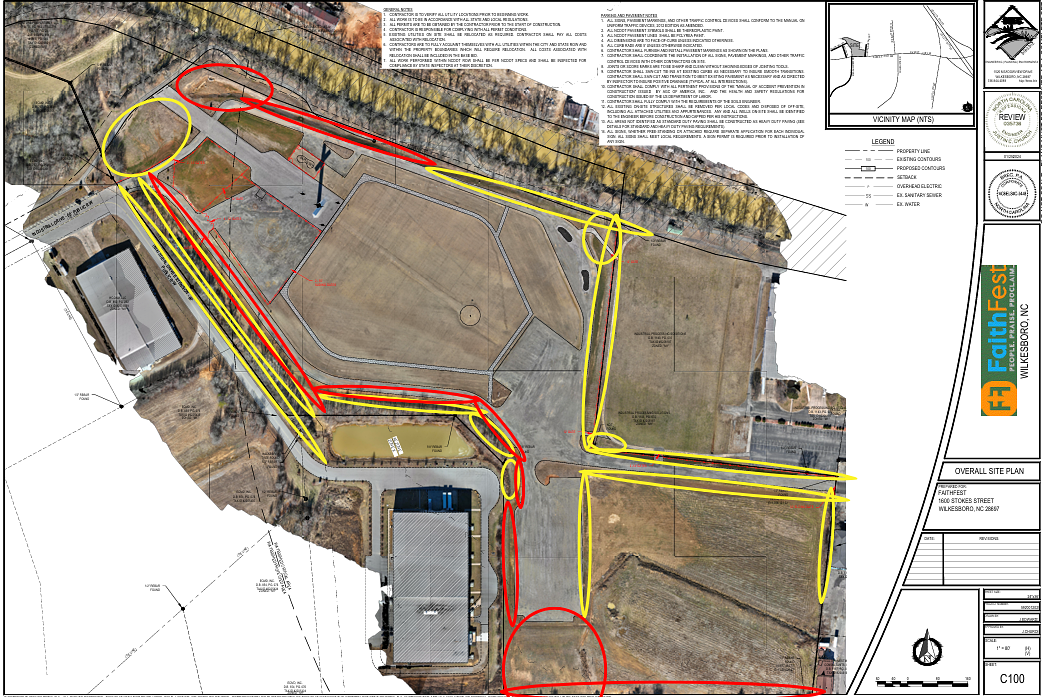
Scroll to zoom · Click and drag to pan
Zone overlays show different office areas. Click a zone to see its label.
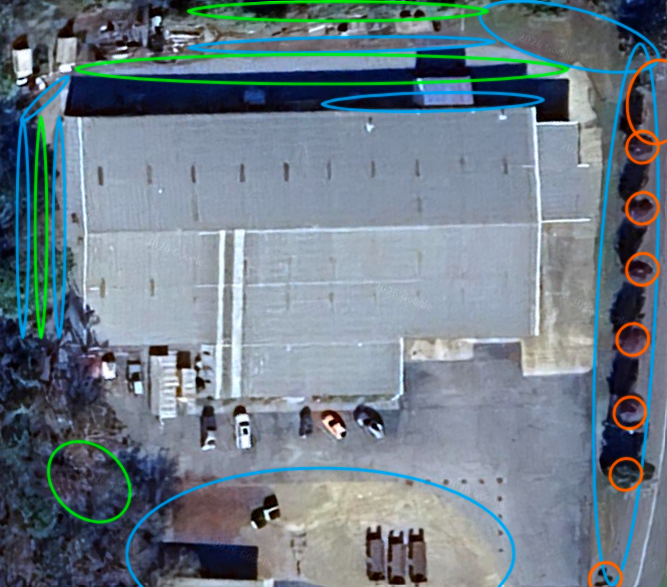
Scroll to zoom · Click and drag to pan
Equipment
Good
📋
No service history yet.
✅
No tasks yet. Add upcoming service tasks here.
Scan this code with any phone camera to go directly to this equipment's page in the app.
Personnel
All contacts
👤
No personnel yet. Click + Add Person to get started.
| Name | Title / Org | Credential | Golf Cart | Wristband | Radio | Lanyard | Areas |
|---|
Messages
Direct messages with your team
Select a team member to message
No conversation selected
Notes
Personal and team notes
Folders
Folders
Deleted Notes
Notes
Notes
No notes in this folder.
Select a note or create a new one
Loading…
Tags:
Saved
New Folder
Folder Name *
Color
Meeting Transcriptions
Record or upload meetings to get transcripts and summaries
⏺
Recording…
Upload audio file
MP3, WAV, M4A, WEBM, OGG, FLAC, MP4 — up to 500 MB
Speakers:
Past Meetings
Select a meeting to view transcript